How can we help?

This knowledge base was built using the Echo knowledge base plugin

You are here:
Print

How to Find the Widgets

After you install and activate the Creative Add-ons plugin, use its widgets as follows.

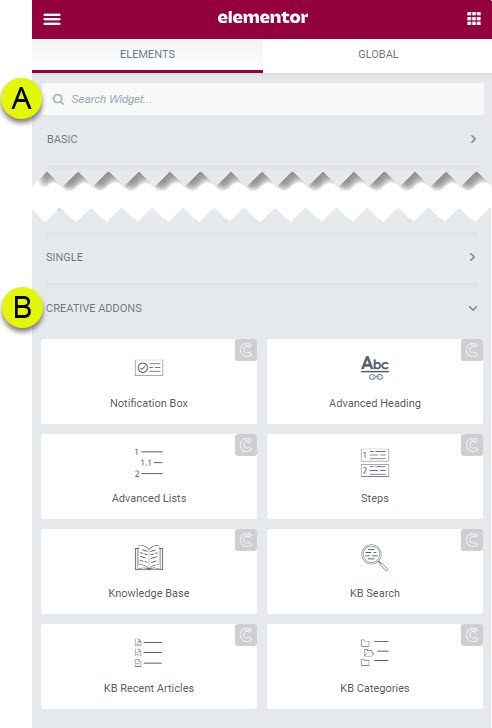
You can locate our widgets in two ways:

A) Search for the widget using the Elementor search box. Type in a keyword. 

B) Find the CREATIVE ADDONS section where you can choose our widgets.

 srcset="https://www.creative-addons.com/wp-content/uploads/2022/06/KB-Logo-YouTube-150x150.png 150w, https://www.creative-addons.com/wp-content/uploads/2022/06/KB-Logo-YouTube-300x300.png 300w, https://www.creative-addons.com/wp-content/uploads/2022/06/KB-Logo-YouTube.png 600w" loading=
About this Knowledge Base

This article was built with the Best Knowledge base on the market.

Get free Echo Knowledge Base
Was this article helpful?
4.3 out Of 5 Stars

13 ratings

5 Stars 69%
4 Stars 15%
3 Stars 0%
2 Stars 0%
1 Stars 15%
5
How can we improve this article?
Please submit the reason for your vote so that we can improve the article.
Table of Contents
Loading...
Loading...
Loading...
Loading...
Loading...

Contact Us

Couldn't find what you were looking for?

Our support team is here to help. Reach out and we'll respond as soon as possible.